Immersive AI | Robotics HTML Template
A) Introduction β top
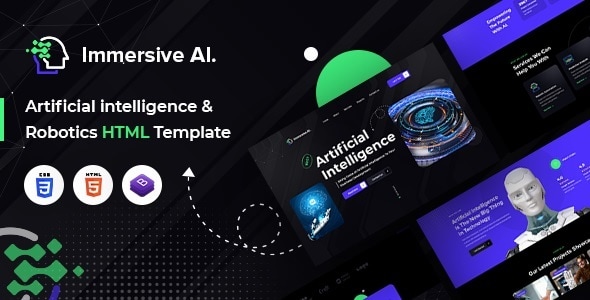
Immersive AI & Robotics HTML5 website template is a custom design package that will take your business to the next level with its cutting-edge design, powerful features and intuitive user experience, this template is the perfect choice for anyone looking to create a stunning website that showcases the power of artificial intelligence. This template is developed with the latest trends in mind, this template features a sleek, modern design that exudes innovation, sophistication and intelligence. The color scheme, typography and layout are all carefully crafted to create a seamless and engaging user experience that will keep your visitors coming back for more. The template includes a wide range of features and elements that are specifically designed for AI-related businesses, such as machine learning, robotics and automation. The template also comes with a wide range of additional features and benefits that will make your life easier and help you create a truly exceptional website. It has a modern, clean, creative & unique design based on the latest technology.
It contains Home Page layout and about page layout and 05+ valid HTML5 page templates designs and Blog detail models. Immersive template features are coded with Bootstrap v4.0, HTML5 & CSS3 and unlimited color schemes. Itβs compatible with all modern browsers and search engine friendly. So showcase your artworks and services with this awesome template!
How to Edit HTML Files? β top
We have included 06+ custom HTML templates like Home Page styles, about styles and projects page style etc. Please open any HTML files with a text editor like Dreamweaver, Notepad or Notepad++ and edit any lines what you want.
C) How to Edit CSS Files? β top
We have included some custom CSS styles like style.css (default). Please open any CSS files with a text editor like Dreamweaver, Notepad or Notepad++ and edit any lines what you want. For example if you want to edit your banner images style open style.css and look at β.banner_main_imageβ for banner image and change your styles.
D) How to use Color Schemes? β top
Please open style.css file from Immersive/assets/css folder with a text editor and build your own colors. #ffffff this is our primary color, you can search and replace all to your new color code.
E) How to use On Load Animation? β top
We are wow.js on load animation for our website. you can edit them by simply adding or changeing the predefined classes name.
jQuery Files
- assets/js/jquery-3.6.0.min.js
- assets/js/bootstrap.min.js
- js/popper.min.js
- js/wow.js
Icons:
- Font-Awesome
font:
- Syne
Global
Colors:
- Primary: #ffffff
- Secondary: #41f681
- Text: #9b9b9e
Font Sizes:
h1 >> 70px
h2 >> 44px
h3 >> 36px
h4 >> 22px
h5 >> 20px
h6 >> 16px
P >> 18px
Want them all?
Get this template and every other premium template with All-Access β unlimited downloads from just $19/mo.
See All-Access- 14-day money-back guarantee
- Instant download after purchase
- Lifetime access & free updates
- Full source files included (HTML, CSS, JS)
- Secure checkout
Part of 7,000+ premium templates
| Last Update | |
| Published | 19-06-2023 |
| High Resolution | Yes |
| Files Included | HTML files, CSS files, JS files, Images,... |
| Tags |